Mastering the Procreate Lettering Brush Bundle: Avoiding Common Pitfalls for Better Digital Art
Digital lettering has transformed from a niche hobby into a vital skill for marketers, bloggers, and creative entrepreneurs. At the heart of this transformation is the right toolset. Many artists rush to download every free resource they find, only to find their workflow cluttered and their results inconsistent. A curated Procreate Lettering Brush Bundle is not just a collection of files; it is a strategic asset that can define your visual identity. However, simply owning these brushes does not guarantee mastery. In fact, misunderstanding how to leverage specific textures and pressure sensitivities can lead to amateurish outcomes that undermine your professional credibility.
The Mistake of Ignoring Texture Specificity
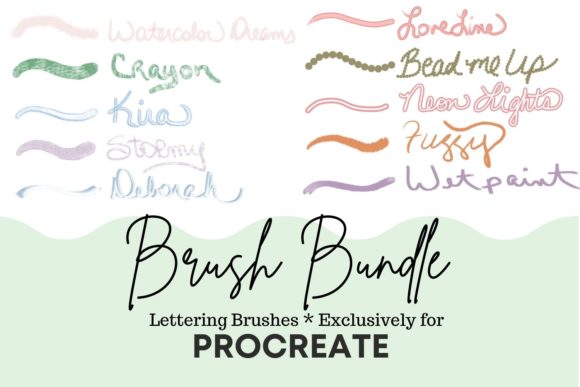
One of the most frequent errors beginners make is treating all digital brushes as interchangeable. They assume a "brush" is just a stroke generator. This overlooks the nuanced engineering behind high-quality assets. For instance, using a hard-edged marker for a project requiring organic warmth creates a visual disconnect. Consider the Watercolor Dreams brush. It is designed specifically for soft lettering or coloring painted objects, excelling when you blend different colors. If you attempt to use a standard ink brush for this effect, you will spend hours manually blending in post-production, wasting valuable time. The correct approach is to select a brush that mimics the physical medium you wish to emulate from the start.
Similarly, the Crayon brush offers a distinct, soft crayon look ideal for playful, nostalgic designs. Using a clean vector-style brush here would strip the artwork of its intended charm. Understanding the inherent personality of each tool in your Procreate Lettering Brush Bundle allows you to match the tool to the emotional tone of your project, rather than forcing a square peg into a round hole.
Overlooking Pressure Sensitivity and Outline Dynamics
Another critical oversight involves ignoring pressure sensitivity settings. Many users keep default settings, failing to realize that brushes like Stormy are engineered to react dynamically to your stylus pressure. Stormy provides a soft chalk look with a very thin outline. When used correctly, it adds depth and variation to every stroke. A common mistake is using it at a static size, which flattens the image. Instead, crank up the size of this brush to create gorgeous sky backgrounds or subtle textures that breathe life into your composition. This dynamic range is what separates professional digital art from flat, computer-generated graphics.
Contrast this with Kira, a favorite among many professionals for its chalk-like finish paired with a darker outline. This brush is excellent for making text pop against busy backgrounds. If you use a brush without an outline feature for similar tasks, your lettering may get lost in the noise. The mistake here is not testing the brush in context. Always test your chosen brush against your background before committing to the final piece. This simple step prevents the frustration of realizing your lettering is illegible after hours of work.
Misusing Decorative Brushes as Primary Tools
Decorative elements can elevate a design, but they can also clutter it if misused. Brushes like Bead Me Up and Neon Lights are powerful, yet they require restraint. Bead Me Up creates streaming beads ranging from small to large and can function as a stamp. A common error is overusing this brush, turning a sophisticated design into a chaotic mess. The better approach is to use it sparingly for accents or borders, allowing the negative space to highlight the intricate bead details.
Neon Lights is another dual-lined brush that is clear in the middle and boldly holds your chosen color in the outline. It is perfect for modern, electric aesthetics. However, using it for body text or long paragraphs reduces readability significantly. Reserve such high-impact brushes for headlines or short, punchy statements. This ensures your design remains communicative rather than just decorative. Remember, clarity is king in visual communication, especially for entrepreneurs and marketers who need to convey messages quickly.
Neglecting the Versatility of Specialty Textures
Many artists categorize brushes too rigidly, assuming a "lettering" brush cannot be used for illustration. This limits creativity and efficiency. Take Fuzzy, for example. While it might seem limited due to its name, this brush has a fuzzy texture that is exceptional for painting trees, bears, ponds, and other organic elements. Limiting it to text ignores its potential for creating cohesive, textured environments around your lettering. By integrating Fuzzy into your background work, you create a unified aesthetic where the text and imagery feel like they belong to the same world.
Likewise, Deborah is a soft color brush that gives a silk ribbon look. It is not just for writing; it is ideal for adding elegant flourishes, ribbons, or soft highlights to illustrations. Using a standard hard brush for these effects would require complex layering and masking. By leveraging the inherent properties of Deborah, you achieve a luxurious finish with minimal effort. This efficiency is crucial for freelancers and small business owners who need to produce high-quality content under tight deadlines.
Choosing Clean Lines Over Complexity
Sometimes, less is more. The Love Line brush is a solid brush that holds your chosen color with an outline of the same color, resulting in a clean-lined appearance. In an era of maximalist trends, there is a tendency to over-complicate designs. However, for corporate clients, educational materials, or minimalist branding, Love Line offers the precision and professionalism required. The mistake here is assuming that "fun" brushes are always better. A balanced toolkit includes both whimsical textures and clean, reliable lines. Knowing when to switch to a clean brush like Love Line demonstrates maturity in design judgment.
Pre-Purchase and Usage Checklist
Before investing in or fully committing to a new Procreate Lettering Brush Bundle, consider these practical checks to ensure satisfaction and usability:
- Compatibility Check: Ensure the brushes are updated for your current version of Procreate. Outdated brushes may lack pressure sensitivity features or behave unpredictably.
- Style Alignment: Review the included brushes against your typical projects. If you primarily create corporate reports, a bundle heavy on Fuzzy and Crayon textures may offer less value than one focused on clean lines and subtle shadows.
- Learning Curve Assessment: Complex brushes like Neon Lights or Bead Me Up may require practice to master. Allocate time for experimentation before using them in client work.
- Layer Management: Textured brushes often look best on separate layers. Plan your layer structure to allow for easy adjustments to opacity and blending modes, especially when using translucent brushes like Watercolor Dreams.
By avoiding these common pitfalls and understanding the specific strengths of each tool, you transform your Procreate Lettering Brush Bundle from a simple download into a powerhouse of creative potential. Whether you are a beginner finding your footing or a professional refining your workflow, the key lies in intentional selection and mindful application. Embrace the unique characteristics of brushes like Kira, Stormy, and Deborah, and let them guide you toward more efficient, expressive, and impactful digital art.