Sandy Procreate Lettering Brush Swatch
Digital lettering has transformed the way artists, entrepreneurs, and hobbyists create visual content. Among the vast array of tools available, the Sandy Procreate Lettering Brush Swatch stands out as a specialized resource for those seeking texture, depth, and a touch of organic realism in their typography. This digital brush is not merely a tool for writing; it is a gateway to creating professional-grade designs that feel tactile and inviting, whether they remain on a screen or are printed onto physical goods.
For creators who have struggled with flat, sterile-looking digital text, this brush offers a solution. It mimics the natural irregularities of hand-drawn lettering while adding a unique shimmering effect reminiscent of a sunlit beach. Understanding how to leverage this tool can significantly elevate your design workflow, saving time on manual texturing and highlighting processes.
Understanding the Unique Characteristics
The core appeal of the Sandy Procreate Lettering Brush Swatch lies in its sophisticated engineering. Unlike standard round brushes that produce uniform lines, this tool is pressure-sensitive and textured. When you press harder with your Apple Pencil, the stroke widens and the texture becomes more pronounced. Lighter touches create delicate, thin lines with subtle grain. This dynamic response allows for a natural flow that closely imitates traditional ink or chalk on textured paper.
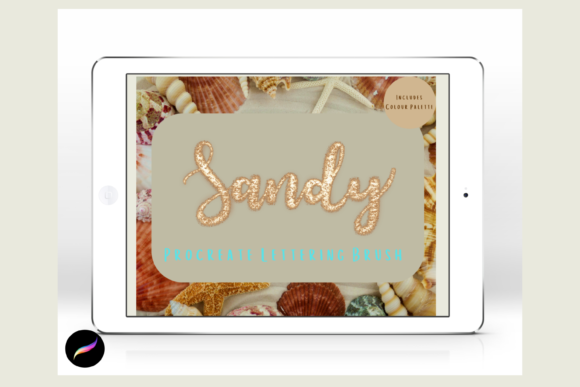
What truly sets this brush apart is its built-in highlight feature. The brush is filled with highlights that resemble a glimmering sandy shore. This means that as you write, you are not just laying down color; you are simultaneously adding dimension. You do not need to switch to a separate white pen or eraser to create shines and reflections. Instead, you can go over chosen areas with the same brush and color used for your initial writing to add extra highlights. This layering capability simplifies the creative process, allowing for rapid iteration and experimentation without cluttering your layer stack.
Additionally, the brush comes with a curated color palette named "Tropical Beach." This inclusion is valuable for beginners who may feel overwhelmed by color theory. The palette provides harmonious shades that complement the sandy texture, ensuring that your lettering looks cohesive and professionally styled from the start.
Practical Applications for Creators and Businesses
The versatility of this digital brush makes it suitable for a wide range of projects. Whether you are a small business owner looking to enhance your brand identity or a hobbyist creating gifts for friends, the Sandy Procreate Lettering Brush Swatch adapts to various needs.
- Greeting Cards and Invitations: The textured, shimmering quality of the brush adds a premium feel to digital invitations for weddings, birthdays, and holidays. It eliminates the need for expensive foil stamping in the design phase, as the digital effect mimics that luxury finish.
- Print on Demand Products: Entrepreneurs selling t-shirts, mugs, or tote bags can use this brush to create eye-catching typography. The high-resolution output ensures that the texture remains crisp when printed, making designs stand out in crowded marketplaces.
- Wall Art and Decor: Digital artists can create large-scale typographic prints for home decor. The sandy texture adds warmth and organic interest to minimalist interiors, bridging the gap between modern digital art and traditional rustic aesthetics.
- Scrapbooking and Journaling: For those who enjoy digital planning or hybrid scrapbooking, this brush allows for personalized headers and titles that look hand-crafted. It adds a personal touch that standard fonts cannot achieve.
- Wrapping Paper and Packaging: Custom wrapping paper designs can be created quickly by repeating lettering patterns. The brush’s efficiency makes it easy to generate seamless patterns for unique gift presentations.
Why This Tool Solves Common Design Problems
Many digital artists face the challenge of making their work look "human." Standard vector fonts often appear too perfect and cold. Conversely, creating realistic hand-lettering from scratch requires significant skill and time. The Sandy Procreate Lettering Brush Swatch bridges this gap. It provides the imperfection and character of hand-lettering with the convenience of a digital tool.
Furthermore, adding highlights and textures manually is a tedious process. It typically involves creating multiple layers, adjusting opacity, and carefully painting in reflections. This brush automates much of that effort. By integrating the highlight effect directly into the stroke, it reduces the number of steps required to achieve a polished look. This efficiency is crucial for professionals working under tight deadlines or beginners who want to achieve high-quality results without a steep learning curve.
Technical Requirements and Setup
Before purchasing or downloading, it is essential to understand the technical constraints. These files are digital brushes designed exclusively for the Procreate App. They will not function in Photoshop, Illustrator, or other graphic design software. To use them effectively, you must have an iPad with the Procreate app installed and an Apple Pencil. The pressure sensitivity and tilt features that give the brush its character rely on the hardware capabilities of the Apple Pencil. Without these specific tools, the brush will not perform as intended.
The installation process is straightforward but requires a few specific steps. Since the files are compressed, you will need a platform to download and unzip them. Services like iCloud are commonly used for storage. Once downloaded, you may need an app like iZip to extract the files. After unzipping, the brush file can be imported directly into Procreate. It is recommended to create a named folder within your Procreate brush library to keep your new tools organized. This simple organizational habit saves time and keeps your workspace clutter-free.
Tips for Getting the Best Results
To maximize the potential of the Sandy Procreate Lettering Brush Swatch, consider these practical tips:
- Experiment with Pressure: Do not hold the Apple Pencil with uniform pressure. Vary your touch to create dynamic thick-and-thin strokes. This variation enhances the textured effect and makes the lettering look more natural.
- Layering for Depth: Use the same brush to go over your initial letters. This action adds additional highlights and intensifies the sandy texture. It is a non-destructive way to build up richness in your design.
- Utilize the Palette: Start with the included "Tropical Beach" color palette to understand how the colors interact with the texture. Once comfortable, you can experiment with custom colors, keeping in mind that lighter shades often showcase the texture better than very dark ones.
- Combine with Other Elements: While the brush is powerful on its own, it works beautifully when paired with simple illustrations or watercolor backgrounds. The sandy texture complements organic themes, such as nature, summer, or coastal designs.
In conclusion, the Sandy Procreate Lettering Brush Swatch is a valuable addition to any digital artist’s toolkit. It combines ease of use with professional-grade results, making it ideal for both beginners and experienced creators. By understanding its unique features and technical requirements, you can unlock new creative possibilities and produce stunning, textured lettering for a variety of personal and commercial projects.