Mastering Digital Fashion Design with Jeans and Pants Procreate Stamps
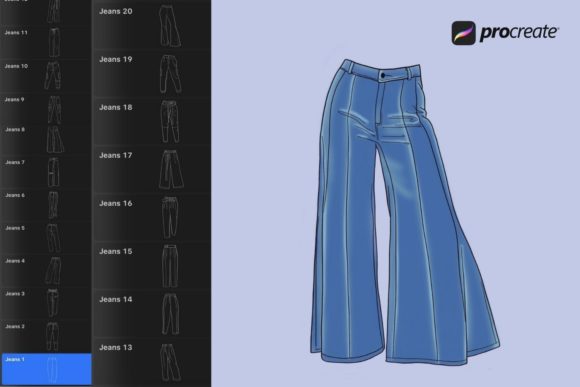
Digital fashion illustration has evolved rapidly, moving from complex vector software to intuitive, touch-based workflows on the iPad. For designers, illustrators, and content creators, speed and consistency are paramount. This is where specialized tools like Jeans and Pants Procreate Stamps become invaluable. These digital assets are designed specifically for the Procreate app, allowing users to insert realistic denim textures, stitching details, and garment shapes with a single tap. However, simply downloading a brush set does not guarantee professional results. Many creators overlook critical compatibility checks and workflow optimizations, leading to frustration rather than efficiency.
Understanding the nuances of these digital stamps can transform your design process. Whether you are a beginner exploring digital art or a seasoned professional looking to streamline client deliverables, knowing how to properly integrate these tools is essential. The goal is not just to add elements to your canvas, but to enhance the realism and coherence of your illustrations without sacrificing artistic control.
Compatibility Misconceptions and Technical Pitfalls
The most common mistake users make involves assuming universal compatibility across digital art platforms. It is crucial to understand that Jeans and Pants Procreate Stamps are engineered exclusively for the Procreate ecosystem on iOS. They are distributed in the .brushset format, a proprietary file type that Adobe Photoshop, Clip Studio Paint, or Affinity Designer cannot read. Attempting to use these files outside of Procreate will result in errors or corrupted data, wasting valuable time.
Furthermore, hardware limitations often go unnoticed until after purchase. While Procreate runs on various iPad models, the performance of complex stamp brushes can vary. Older iPads may experience lag when using high-resolution stamps with multiple texture layers. Before investing in any digital asset library, verify that your device supports the latest version of Procreate and has sufficient processing power to handle layered brush dynamics. This preemptive check ensures that the "clean and easy to use" promise of the product holds true in practice.
The Trap of One-Size-Fits-All Application
A frequent oversight among beginners is treating stamps as static clip-art rather than dynamic design elements. Users often drop a jeans stamp onto the canvas and leave it at default settings. This approach leads to repetitive, unnatural-looking illustrations where every pair of pants appears identical in lighting, perspective, and fabric weight. Real denim varies significantly based on wash, wear, and fit. Relying solely on the default appearance of a stamp undermines the credibility of your artwork.
To avoid this, leverage the full customization potential of Procreate. Since these stamps can be used in any color or opacity, you should actively adjust these parameters to match the lighting environment of your scene. For instance, reducing the opacity can help blend the stamp into underlying skin tones or background elements, creating a more cohesive composition. Additionally, using the transformation tools to warp or distort the stamp allows you to mimic the natural drape of fabric over different body types. This level of adjustment turns a generic asset into a bespoke design element.
Workflow Efficiency and File Management
Efficiency is the primary selling point of digital stamps, yet poor file management can negate these benefits. Many users download the .brushset file and immediately import it without organizing their brush library. Over time, this leads to cluttered interfaces where finding specific denim textures becomes a chore. A better approach is to create dedicated brush sets or groups within Procreate specifically for clothing assets. This organizational habit saves time during intense creative sessions and keeps your workspace tidy.
Another overlooked detail is the importance of backing up your purchased files. Digital downloads are typically accessible via email links, but these links can expire or get lost in crowded inboxes. After receiving the confirmation email with the download link, save the .brushset file to a cloud storage service or an external drive. This ensures that if you switch devices or accidentally delete the brush from your app, you can quickly restore your toolkit without needing to contact support or repurchase the item.
Installation and Setup Best Practices
Proper installation is the foundation of a smooth user experience. The process is straightforward, but skipping steps can lead to missing brushes or import failures. Here is the correct procedure to ensure your Jeans and Pants Procreate Stamps are ready for use:
- Verify Payment and Email: After completing your purchase, wait for the payment confirmation email. Check your spam folder if the message does not appear in your primary inbox within a few minutes.
- Download the File: Click the provided download link to save the
.brushsetfile to your iPad’s Files app. Ensure the download completes fully before attempting to open it. - Import into Procreate: Open the Procreate app. Tap on the brush icon to open the Brush Library. Then, tap on the "+" sign or the "Import" option, depending on your version, and select the downloaded
.brushsetfile. Alternatively, you can tap on the file directly in the Files app, and it should automatically open in Procreate if the association is set correctly.
If the brushes do not appear immediately, restart the app. This simple step resolves most synchronization issues between the iOS file system and the Procreate interface.
Evaluating Quality and Artistic Integrity
When integrating pre-made assets into your work, maintaining artistic integrity is vital. Some creators worry that using stamps might make their work look "cheap" or unoriginal. This concern usually stems from improper usage rather than the tool itself. High-quality stamps, such as those featuring detailed stitching and realistic fabric folds, serve as a base layer. They provide structure and texture that would otherwise take hours to paint manually.
To maintain originality, treat the stamp as a starting point. Add hand-painted highlights, shadows, and distress marks to customize the garment. Mix different stamps together to create unique combinations. For example, combine a skinny jean silhouette with a distressed denim texture from another brush. This hybrid approach ensures that while you benefit from the speed of the stamp, the final output remains unique to your artistic voice.
Making an Informed Decision
Before purchasing any digital asset, consider your specific needs. If you frequently illustrate characters wearing casual attire, Jeans and Pants Procreate Stamps are a logical investment. However, if your work focuses primarily on formal wear or fantasy costumes, the utility may be limited. Evaluate your current project pipeline to determine if these tools will genuinely enhance your workflow.
Additionally, review the license terms associated with the download. Most digital brushes allow for commercial use in your final artwork, but restrictions may apply to reselling the brush files themselves. Understanding these boundaries protects you from legal issues and ensures ethical usage of the creator’s intellectual property.
In conclusion, Jeans and Pants Procreate Stamps offer a powerful solution for digital artists seeking efficiency without compromising quality. By avoiding common pitfalls related to compatibility, customization, and organization, you can maximize the value of these tools. Remember that technology serves creativity, not replaces it. Use these stamps to handle the tedious aspects of texture and form, freeing your mind to focus on composition, storytelling, and artistic expression. With the right approach, these simple digital assets can become indispensable components of your professional toolkit.