Enhancing Your Digital Planning Workflow with Procreate Brush Stamps
In the rapidly evolving world of digital organization, the transition from paper to pixel has opened up unprecedented avenues for creativity and efficiency. For many enthusiasts, the digital bullet journal or planner is not just a tool for scheduling; it is a canvas for self-expression. At the heart of this creative revolution lies a specific type of digital asset: the Planner Brush Stamp. These tools, designed specifically for applications like Procreate on the iPad, allow users to streamline their planning process while maintaining a handmade, artistic aesthetic. Understanding how to leverage these digital stamps can transform a mundane task into an engaging daily ritual.
The Evolution of Digital Planning
Traditional bullet journaling requires a steady hand, a variety of pens, and a significant amount of time to create layouts from scratch. While this analog approach is cherished by many, it can be a barrier for those who desire beautiful spreads but lack the time or confidence in their drawing skills. This is where digital planning bridges the gap. By utilizing an iPad and an Apple Pencil, users gain the ability to undo mistakes, duplicate elements, and experiment with colors without wasting physical resources.
However, even in a digital environment, drawing complex calendar grids or decorative headers every month can become repetitive and time-consuming. This is the primary purpose of Procreate brush stamps. They serve as pre-designed, reusable assets that retain the charm of hand-drawn art but offer the convenience of digital replication. Whether you are a student organizing study schedules, a professional managing project timelines, or a creative individual tracking habits, these stamps provide a foundational structure that enhances productivity without sacrificing style.
Why Choose Digital Stamps Over Static Templates?
A common misconception is that digital planners rely solely on static PDF templates. While hyperlinked PDFs are popular, they often lack flexibility. If a user wants to change the color scheme of a monthly header or adjust the size of a calendar grid to fit more notes, a static image can be limiting. In contrast, brush stamps in Procreate are dynamic. They are essentially custom brushes that "stamp" an image onto your canvas with a single tap. This distinction is crucial for users who value customization.
With brush stamps, you are not locked into a fixed design. You can resize the element infinitely without losing quality, rotate it to fit unique layout constraints, and most importantly, recolor it. Because these stamps often come with transparent backgrounds, they integrate seamlessly into any existing page design. This level of adaptability ensures that your planner evolves with your tastes, allowing you to create a new product style every year, or even every month, keeping the experience fresh and engaging.
Exploring the Features of Icon and Doodle Stamp Sets
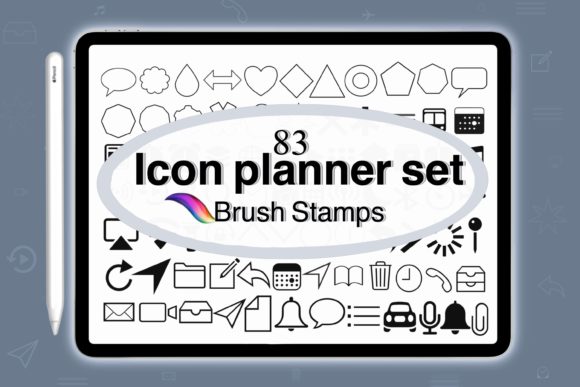
When selecting a digital asset pack, such as the Icon for Planner Brush Stamps, it is essential to understand the components included. A comprehensive set typically includes a wide variety of elements designed to cover all aspects of planning. For instance, a robust collection might include 83 brushes, covering both functional and decorative needs. This variety ensures that users have the tools necessary to build complete spreads from scratch.
- Calendar Grids: The core of any planner. High-quality sets include both Monday start and Sunday start configurations to accommodate different regional preferences and personal workflows.
- Month Headers: Decorative text or graphical elements that clearly delineate sections, adding visual hierarchy to the page.
- Functional Icons: Small doodles representing tasks, events, weather, or moods, which help in quick visual scanning of the journal.
- Transparent Backgrounds: Perhaps the most critical technical feature. This allows users to layer textures, patterns, or solid colors behind the stamps, ensuring the design feels integrated rather than pasted on.
The inclusion of both Monday and Sunday start sets is particularly significant. It acknowledges the global nature of digital planning, where users may follow different standard weeks. By providing both options, the creator ensures that the tool is universally applicable, removing the need for users to manually redraw grids to match their preferred weekly structure.
Practical Application in Procreate
Using these stamps is designed to be intuitive, even for beginners. The process begins with importing the .brushset file into the Procreate app. Once installed, the brushes appear in the brush library, ready for use. To create a monthly spread, a user simply selects the appropriate month stamp brush and taps it on the canvas. From there, the creative control shifts entirely to the user.
For example, if you wish to create a minimalist black-and-white spread, you can leave the stamps as they are. However, if you prefer a vibrant, colorful theme, you can use the color picker to change the hue of the stamp instantly. You can also add background colors or borders using standard Procreate tools. The ability to manipulate these elements means that no two pages need ever look the same, fostering a sense of ownership and creativity.
Furthermore, these tools are not limited to on-screen viewing. Many users wish to export their designs for printing or sharing. To achieve a transparent background PNG for use in other digital planner apps or for printing on sticker paper, the process is straightforward. Users simply turn off the bottom background layer in Procreate and save the image to their iPad photos as a PNG. This versatility extends the utility of the brush stamps beyond the Procreate ecosystem, making them a valuable asset for any digital creator.
The Broader Impact on Creativity and Productivity
The integration of tools like Doodle for Bullet Journal Planner Brush stamps into daily routines has a psychological benefit. When the friction of creation is reduced, individuals are more likely to engage with their planning systems consistently. The "blank page syndrome" is a common hurdle in journaling; having a library of beautiful, easy-to-use stamps lowers the barrier to entry. Users spend less time worrying about layout mechanics and more time reflecting on their goals and tasks.
Moreover, this technology supports sustainable practices. By moving to a digital format, users reduce paper waste and the need for physical supplies. The instant digital download model means that once purchased, the assets are available forever, allowing for endless reuse. This aligns with modern values of efficiency and environmental consciousness.
Building a Sustainable Creative Habit
To get the most out of these digital tools, it is helpful to adopt a flexible mindset. Do not feel pressured to use every stamp in every spread. Instead, view the collection as a toolkit. Some months may call for elaborate, decorated calendars, while others may require simple, functional lists. The beauty of digital planning is the freedom to pivot. You can create a white or colored box behind your month stamp to make it pop, or leave it transparent for a subtle look. The limits are defined only by your imagination.
In conclusion, Procreate brush stamps represent a harmonious blend of art and utility. They empower users to take control of their digital planning experience, offering the warmth of handmade aesthetics with the precision of digital technology. Whether you are creating yearly calendars, monthly trackers, or daily logs, these tools provide the foundation for a personalized, efficient, and visually pleasing organizational system. By embracing these digital assets, you invest not just in a file, but in a more enjoyable and sustainable way to manage your life.