Elevating Digital Imagery with the Lens Flares Realistic Light Glowing Set
In the realm of digital photography and graphic design, lighting is not merely a technical necessity; it is the primary storyteller. The way light interacts with a lens can transform a flat, two-dimensional image into a dynamic scene filled with depth, atmosphere, and emotion. For years, achieving authentic optical anomalies required specific physical conditions, expensive glass, and perfect timing. Today, however, designers and photographers have access to powerful digital tools that replicate these effects with stunning accuracy. Among the most effective resources available is the Lens Flares Realistic Light Glowing Set, a collection designed to bridge the gap between raw capture and polished final art.
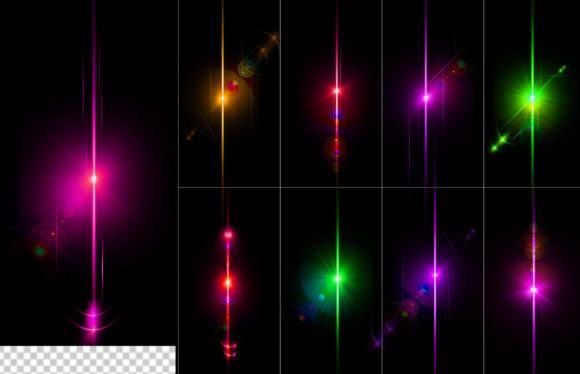
This comprehensive set offers nine distinct, high-resolution lens flare elements that serve as essential assets for creative professionals. Whether you are retouching wedding portraits, designing movie posters, or creating social media content, understanding how to integrate these light effects can significantly enhance the visual impact of your work. The inclusion of both .PSD and .JPG file formats ensures compatibility across various software ecosystems, making this tool versatile for users ranging from beginners to seasoned experts.
The Anatomy of Authentic Light Effects
To truly appreciate the value of the Lens Flares Realistic Light Glowing Set, one must first understand what makes a lens flare look "real." In physical photography, a lens flare occurs when bright light enters the camera lens at an angle, causing internal reflections and scattering within the glass elements. This phenomenon creates artifacts such as rings, polygons, streaks, and hazy glows. Poorly executed digital flares often look pasted on—too sharp, uniformly colored, or lacking the subtle diffusion that characterizes real glass optics.
The nine lens flares included in this set are crafted to mimic these organic imperfections. They feature soft edges, natural color gradients, and varying intensities that blend seamlessly with underlying images. The high-resolution nature of the files means that even when scaled up for large-format prints or billboards, the details remain crisp and free from pixelation. This attention to detail is crucial because the human eye is incredibly sensitive to lighting inconsistencies. A fake flare breaks immersion, while a realistic one enhances the perceived quality of the entire composition.
Versatility Through File Formats
One of the standout features of this product is the dual-format delivery. The inclusion of Photoshop .PSD files is a game-changer for professional workflows. PSD files typically retain layer information, allowing users to adjust blending modes, opacity, and color balance non-destructively. This flexibility is vital when matching the flare to the specific color temperature and exposure of the background image. For instance, a warm, golden-hour flare might need to be cooled down slightly to match a twilight scene, a task that is straightforward with layered PSDs but difficult with flattened images.
Conversely, the JPG files provided are optimized for speed and compatibility. With 100% transparency handled effectively (often via black backgrounds that are easily removed using blending modes like "Screen" or "Lighten"), these files are ideal for quick edits in software that may not support complex layer structures. Mobile editors, web-based design tools, and video editing platforms can all utilize these JPG assets efficiently. This duality ensures that the Lens Flares Realistic Light Glowing Set fits into any workflow, whether you are working in Adobe Photoshop, Lightroom, Premiere Pro, or Canva.
Practical Applications in Modern Design Workflows
The utility of realistic lens flares extends far beyond simple aesthetic enhancement. They serve functional purposes in composition and narrative direction. Here are several scenarios where these nine high-resolution flares can elevate your projects:
- Cinematic Poster Design: Movie posters often use dramatic lighting to convey mood. A well-placed flare can draw the viewer’s eye to the protagonist’s face or create a sense of epic scale. The glowing elements in this set add that blockbuster feel without requiring a Hollywood budget.
- Product Photography: When showcasing tech gadgets, jewelry, or beverages, adding a subtle highlight or reflection can make the product appear more premium. A small, sharp flare can simulate the reflection of studio lights, adding sparkle and dimension to otherwise static objects.
- Landscape Enhancement: Sometimes, the natural light in a landscape photo is flat due to overcast weather. Adding a sunburst or glow effect can simulate a sunrise or sunset, injecting warmth and energy into the scene. The realistic diffusion in this set prevents the edit from looking artificial.
- Social Media Content: In the fast-paced world of Instagram and TikTok, visuals must grab attention instantly. A strategic light leak or flare can add a dreamy, nostalgic vibe to lifestyle photos, increasing engagement and shareability.
Integration Techniques for Best Results
While having high-quality assets is important, knowing how to use them is equally critical. The Lens Flares Realistic Light Glowing Set is designed to be user-friendly, but applying some best practices will yield superior results. First, always consider the light source in your original image. If the sun is coming from the top left, your added flare should originate from that same direction. Consistency in lighting logic is the key to believability.
Second, utilize blending modes effectively. When using the JPG files, set the layer mode to Screen or Add. This instructs the software to ignore the black pixels and only display the bright, glowing parts of the flare. For the PSD files, explore the individual layers. You may find separate layers for the core brightness, the chromatic aberration, and the outer glow. Adjusting the opacity of each layer independently allows for fine-tuned control over the intensity of the effect.
Third, don’t be afraid to mask. Rarely will a flare look perfect straight out of the box. Use a soft brush on a layer mask to fade out parts of the flare that overlap with dark subjects or obscure important details. This technique helps the light interact naturally with the environment, appearing to wrap around objects rather than sitting flatly on top of them.
Why Resolution and Transparency Matter
In digital assets, resolution is synonymous with longevity. Low-resolution flares may look acceptable on a smartphone screen but will reveal their weaknesses when printed or viewed on 4K monitors. The high-resolution specification of this set ensures that the intricate details of the light refraction—such as the tiny hexagonal shapes or circular bokeh artifacts—are preserved. This clarity allows designers to scale the flares up or down without losing quality, providing maximum flexibility for different project requirements.
Furthermore, the promise of 100% transparency (or easy isolation) is a significant time-saver. In older or cheaper asset packs, users often struggle with halos or jagged edges around the light effects. These artifacts require tedious manual cleanup. With this set, the clean edges mean less time spent on preparation and more time focused on creative composition. For professionals billing by the hour, this efficiency translates directly into cost savings and higher productivity.
Choosing the Right Flare for Your Project
With nine different options included in the Lens Flares Realistic Light Glowing Set, selection becomes a creative decision. Some flares may feature long, horizontal streaks suitable for anamorphic cinematic looks, while others might offer round, soft glows ideal for romantic or ethereal themes. It is advisable to experiment with multiple variations from the set on a single image. Often, combining two different flares—one for the core light source and another for ambient scatter—can create a complex, multi-layered lighting effect that looks exceptionally natural.
Consider the color palette of your project as well. While many flares are white or gold, some may have blue or purple tints depending on the simulated lens coating. Matching the flare’s hue to the overall color grading of your image ensures cohesion. If your image has a teal-and-orange grade, a warm orange flare will complement the shadows, while a cooler flare might clash unless adjusted.
Conclusion: A Staple for the Modern Creative Toolkit
The Lens Flares Realistic Light Glowing Set represents more than just a collection of images; it is a tool for enhancing visual storytelling. By providing high-resolution, versatile, and realistic light effects, it empowers creators to overcome the limitations of natural lighting and hardware. Whether you are a photographer looking to salvage a backlit shot or a graphic designer aiming to add drama to a layout, these nine lens flares offer the precision and quality needed to achieve professional results. Embracing these digital assets allows for greater creative freedom, ensuring that your final output is not just seen, but felt.