Elevating Digital Art with Leaves Shadow Overlay and Procreate Stamps
In the rapidly evolving landscape of digital illustration, the difference between a good piece and a truly captivating one often lies in the subtleties of light and texture. For artists, designers, and content creators using iPad-based workflows, achieving photorealistic depth without spending hours on manual rendering is a constant pursuit. This is where specialized tools like Leaves Shadow Overlay and Procreate Stamps have become indispensable assets. These resources are not merely shortcuts; they are sophisticated design elements that bridge the gap between flat digital canvases and the organic complexity of the natural world.
The demand for high-quality, ready-to-use botanical elements has surged as visual content becomes increasingly central to branding, social media engagement, and digital storytelling. Modern audiences expect visuals that feel authentic and textured, moving away from the sterile perfection of early vector art toward styles that mimic the imperfections and beauty of photography. By integrating plant shadows and botanical overlays into their workflow, creators can instantly add a layer of professional polish that resonates with contemporary aesthetic trends.
The Shift Toward Organic Textures in Digital Design
Over the past decade, digital art tools have advanced significantly, yet the challenge of replicating natural lighting remains complex. Traditional methods of painting shadows require a deep understanding of light sources, opacity, and color theory. While mastering these skills is valuable, the modern creative workflow often demands efficiency without compromising quality. This shift has driven the popularity of assets like Leaves Shadow Overlay and Procreate Brush Stamps.
These tools reflect a broader trend in creative technology: the democratization of high-end visual effects. What once required advanced Photoshop compositing or 3D rendering can now be achieved with a few taps on an iPad. The inspiration for these stamps, drawn directly from high-resolution photos, ensures that every leaf vein and shadow gradient retains the authenticity of real-world physics. This photo-based approach allows artists to bypass the uncanny valley of digitally painted foliage, providing results that feel grounded and tangible.
For professionals ranging from freelance illustrators to marketing agencies, this evolution means faster turnaround times for client projects. Whether designing a wedding invitation, a book cover, or a social media campaign, the ability to quickly overlay realistic botanical shadows allows for rapid iteration. Creators can test different compositions and lighting scenarios in minutes rather than hours, fostering a more experimental and dynamic creative process.
Understanding the Utility of Botanical Overlays
At their core, Leaves Shadow Overlay and Procreate Stamps are pre-rendered digital assets designed to simulate the way light interacts with foliage. Unlike simple clipart, these overlays are crafted with transparency and blending modes in mind, allowing them to integrate seamlessly with underlying artwork. The key advantage lies in their versatility. A single stamp can be resized, rotated, and adjusted in opacity to suit various lighting conditions, from the harsh contrast of midday sun to the soft diffusion of twilight.
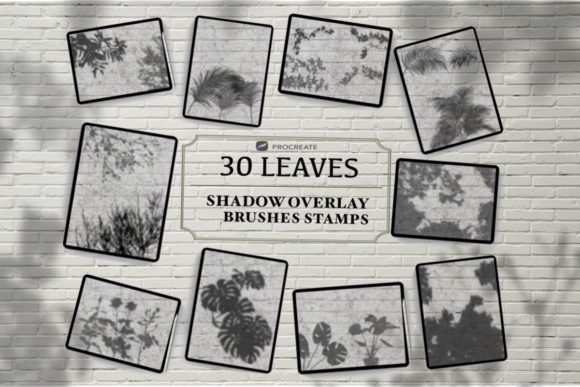
The inclusion of 30 Botanical Shades Overlay in a comprehensive pack offers creators a diverse palette of options. This variety is crucial because no two shadows are identical in nature. Factors such as leaf type, density, and distance from the surface all affect the resulting shadow pattern. By providing thirty distinct variations, these brush sets enable artists to avoid repetitive patterns that can make digital art look artificial. Instead, they can build complex, layered compositions that mimic the randomness and beauty of a real garden.
Moreover, these tools are not limited to traditional illustration. Graphic designers use them to add depth to typography, creating the illusion that text is resting beneath a canopy of leaves. Photographers utilize them to enhance portraits, adding environmental context to studio shots. The cross-disciplinary appeal of Plant Shadow for Procreate highlights its value as a multifunctional tool in the modern creator’s toolkit.
Streamlining Your Workflow with Procreate Brush Stamps
One of the most significant benefits of using Leaves Shadow Overlay and Procreate Brush Stamps is the seamless integration with the Procreate ecosystem. Procreate has become the industry standard for digital painting on iOS, favored for its intuitive interface and powerful brush engine. However, creating realistic textures from scratch within the app can be time-consuming. Pre-made brush sets eliminate this bottleneck.
When you download a file containing these assets, the installation process is straightforward. Typically, the package includes a zip file containing the brush set. After downloading, users simply open the file in Procreate, and the palette is ready to go at their fingertips. This ease of use lowers the barrier to entry for beginners while saving experienced artists valuable time. There is no need for complex layer masking or external editing software; everything happens within the native environment of the app.
The technical structure of these stamps is optimized for performance. They are designed to respond to pressure sensitivity and tilt, allowing for natural variation in each stroke. This interactivity ensures that even when using pre-made elements, the artist retains control over the final output. You can adjust the size, opacity, and flow to match the specific mood of your piece, ensuring that the shadows enhance rather than overpower the composition.
Practical Applications for Creators and Businesses
The practical implications of incorporating Leaves Shadow Overlay and Procreate Stamps extend beyond individual artistic satisfaction. For businesses and entrepreneurs, visual consistency and quality are paramount. Branding materials that feature organic, high-quality textures often perceive as more premium and trustworthy. By using these botanical elements, companies can create cohesive visual identities that stand out in crowded digital marketplaces.
Consider a lifestyle blogger creating content for Instagram. Using 30 Botanical Shades Overlay, they can transform a simple flat-lay photo of products into a stylized editorial image. The added shadows provide context and depth, making the product appear as part of a curated scene rather than an isolated object. Similarly, educators creating digital worksheets or presentations can use these elements to make learning materials more engaging and visually appealing.
Freelancers also benefit significantly. Offering clients quick turnaround times with high-quality results can lead to repeat business and positive referrals. By leveraging tools like Plant Shadow for Procreate, freelancers can take on more projects without burning out, maintaining a healthy balance between creativity and productivity. The ability to deliver "fabulous" artwork efficiently becomes a competitive advantage in the gig economy.
Maximizing the Potential of Your Brush Set
To get the most out of your Leaves Shadow Overlay and Procreate Brush Stamps, it is essential to understand how to blend them effectively with your existing artwork. Here are some recommendations for achieving professional results:
- Experiment with Blending Modes: Do not limit yourself to the "Normal" blending mode. Try "Multiply" for deeper shadows, "Overlay" for subtle texture, or "Soft Light" for a gentle atmospheric effect. Each mode interacts differently with your base colors, offering unique visual outcomes.
- Adjust Opacity and Flow: Real shadows are rarely solid black. Lower the opacity of your stamps to allow underlying colors to show through, creating a more transparent and realistic look. Varying the flow can also help build up density gradually.
- Layer Multiple Stamps: Avoid using a single stamp repeatedly. Layer different stamps from the 30 Botanical Shades Overlay collection to create complex, non-repetitive patterns. Rotate and scale each layer to break up uniformity.
- Match Light Sources: Ensure that the direction of your shadow stamps aligns with the primary light source in your artwork. Inconsistent lighting can break the illusion of realism. Use the transform tool to rotate stamps until the shadow direction matches your scene.
- Color Correction: Shadows are influenced by ambient light. Use hue and saturation adjustments to tint your shadows slightly, matching the color temperature of your environment. For example, shadows in a sunset scene might have a warm, orange undertone.
By following these practices, you can ensure that your use of Leaves Shadow Overlay and Procreate Stamps enhances the overall quality of your work. These tools are designed to support your creativity, not replace it. They provide the foundational elements upon which you can build your unique artistic vision.
Conclusion: Embracing Efficiency and Quality
The integration of Leaves Shadow Overlay, Procreate Stamps, and 30 Botanical Shades Overlay into your digital workflow represents a smart adaptation to modern creative demands. As the line between photography and digital art continues to blur, tools that offer photorealistic textures with ease of use will remain essential. Whether you are a seasoned professional or a hobbyist looking to elevate your sketches, these resources provide a pathway to more sophisticated and engaging artwork.
By embracing these technologies, you are not just saving time; you are expanding your creative possibilities. The inspiration drawn from real photos ensures that your digital creations retain a connection to the natural world, resonating with audiences who crave authenticity. With the right techniques and a willingness to experiment, you can make your artwork look more fabulous, turning these digital elements into a vital part of your success.